这是一篇 ESPIDF 框架按键组件实例分享的文章,我已经写了一个基础的例子,在此贴出以便自己往后查阅也分享给需要的朋友。
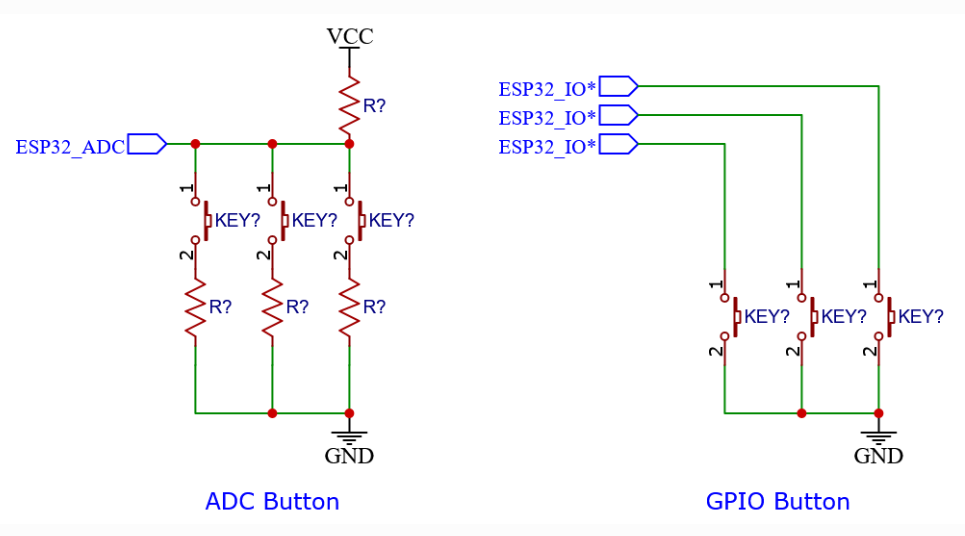
Button 组件网址:https://components.espressif.com/components/espressif/button,这个组件支持两种物理硬件连接方式,一种是使用 ADC 电压采样的原理,不同阈值的电压值代表不同的按键。另一种是读取独立GPIO口电平高低的方式。我用的是独立GPIO口电平读取方式。
这是官方文档:button 组件官方文档
我们这篇文章主要分享这个函数:
/**************************************************************************************************
 * @brief 按键初始化函数
 *
 * @param button_num
 * @date 2026-02-19
 * @details
 * @Call 该函数调用的其他函数
 * @Caller 调用该函数的其他函数
 * @author 小土坡
 * @note
 *************************************************************************************************/
void xtp_button_init(uint32_t button_num)
{
    button_config_t btn_cfg = {0}; // 这里可以直接这样写,组件函数内部会自动设置默认值
    button_gpio_config_t gpio_cfg = {
        .gpio_num = button_num,
        .active_level = 0,
        .enable_power_save = true, // 兼容省电模式
        .disable_pull = false      // 使用内部上拉电阻
    };

    button_handle_t btn;

    /* 新建一个 GPIO 按键设备 */
    esp_err_t ret = iot_button_new_gpio_device(&btn_cfg, &gpio_cfg, &btn);
    assert(ret == ESP_OK);

    /* 注册两个按键事件函数 */
    ret = iot_button_register_cb(btn, BUTTON_SINGLE_CLICK, NULL, button_single_click_cb, NULL);
    ret |= iot_button_register_cb(btn, BUTTON_LONG_PRESS_START, NULL, on_button_long_press, NULL);

    assert(ret == ESP_OK);
}
主要函数列表:
iot_button_new_gpio_device()创建一个 gpio 按键对象iot_button_register_cb()给按键对象注册回调函数
实验效果:
- 单击按钮调用单击回调函数
button_single_click_cb() - 长按按钮调用长按回调函数
on_button_long_press()
下面贴出代码:
#include "button_gpio.h"
#include "driver/gpio.h"
#include "esp_log.h"
#include "freertos/FreeRTOS.h"
#include "freertos/task.h"
#include "iot_button.h"
#include <stdio.h>

static const char *TAG = "blink";

TaskHandle_t led_handle = NULL;
TaskHandle_t motor_handle = NULL;

// GPIO 定义
#define LED_PIN_NUM GPIO_NUM_1
#define Key_PIN_NUM GPIO_NUM_0
#define MOTOR_PIN_NUM GPIO_NUM_11

/**************************************************************************************************
 * @brief 按键单击回调函数
 *
 * @param arg
 * @param data
 * @date 2026-02-19
 * @details
 * @Call 该函数调用的其他函数
 * @Caller 调用该函数的其他函数
 * @author 小土坡
 * @note
 *************************************************************************************************/
static void button_single_click_cb(void *arg, void *data)
{
    iot_button_print_event((button_handle_t)arg);
    printf("Button single click detected\n");

    // 改变 led 任务的挂起与恢复挂起
    if (led_handle != NULL) {
        if (eTaskGetState(led_handle) == eSuspended) { // 挂起态
            printf("LED 任务已恢复运行!\n");
            vTaskResume(led_handle); // 恢复任务
        } else {
            printf("LED 任务已被挂起!\n");
            gpio_set_level(LED_PIN_NUM, 1); // 熄灭 LED
            vTaskSuspend(led_handle);       // 挂起任务
        }
    }

    // 改变 motor 任务的挂起与恢复挂起
    if (motor_handle != NULL) {
        if (eTaskGetState(motor_handle) == eSuspended) { // 挂起态
            printf("Motor 任务已恢复运行!\n");
            vTaskResume(motor_handle); // 恢复任务
        } else {
            printf("Motor 任务已被挂起!\n");
            gpio_set_level(MOTOR_PIN_NUM, 0); // 关闭马达
            vTaskSuspend(motor_handle);       // 挂起任务
        }
    }
}

/**************************************************************************************************
 * @brief 长按回调函数
 *
 * @param arg
 * @param data
 * @date 2026-02-19
 * @details
 * @Call 该函数调用的其他函数
 * @Caller 调用该函数的其他函数
 * @author 小土坡
 * @note
 *************************************************************************************************/
static void on_button_long_press(void *arg, void *data)
{
    iot_button_print_event((button_handle_t)arg);
    printf("Button long pressed\n");
}

/**************************************************************************************************
 * @brief 按键初始化函数
 *
 * @param button_num
 * @date 2026-02-19
 * @details
 * @Call 该函数调用的其他函数
 * @Caller 调用该函数的其他函数
 * @author 小土坡
 * @note
 *************************************************************************************************/
void xtp_button_init(uint32_t button_num)
{
    button_config_t btn_cfg = {0}; // 这里可以直接这样写,组件函数内部会自动设置默认值
    button_gpio_config_t gpio_cfg = {
        .gpio_num = button_num,
        .active_level = 0,
        .enable_power_save = true, // 兼容省电模式
        .disable_pull = false      // 使用内部上拉电阻
    };

    button_handle_t btn;

    /* 新建一个 GPIO 按键设备 */
    esp_err_t ret = iot_button_new_gpio_device(&btn_cfg, &gpio_cfg, &btn);
    assert(ret == ESP_OK);

    /* 注册两个按键事件函数 */
    ret = iot_button_register_cb(btn, BUTTON_SINGLE_CLICK, NULL, button_single_click_cb, NULL);
    ret |= iot_button_register_cb(btn, BUTTON_LONG_PRESS_START, NULL, on_button_long_press, NULL);

    assert(ret == ESP_OK);
}

/**************************************************************************************************
 * @brief LED 任务
 *
 * @param vParam
 * @date 2026-02-17
 * @details
 * @Call 该函数调用的其他函数
 * @Caller 调用该函数的其他函数
 * @author 小土坡
 * @note
 *************************************************************************************************/
void led_task(void *vParam)
{
    // 设置日志级别
    esp_log_level_set(TAG, ESP_LOG_WARN);

    gpio_set_direction(LED_PIN_NUM, GPIO_MODE_OUTPUT);
    uint8_t led_state = 0;

    while (1) {
        ESP_LOGI(TAG, "led task...");
        gpio_set_level(LED_PIN_NUM, led_state = !led_state);
        vTaskDelay(pdMS_TO_TICKS(1000));
    }
}

/**************************************************************************************************
 * @brief 震动马达任务
 *
 * @param vparam
 * @date 2026-02-17
 * @details
 * @Call 该函数调用的其他函数
 * @Caller 调用该函数的其他函数
 * @author 小土坡
 * @note
 *************************************************************************************************/
void motor_task(void *vparam)
{
    gpio_set_direction(MOTOR_PIN_NUM, GPIO_MODE_OUTPUT);
    uint16_t hight_num = 100;
    uint16_t low_num = 200;
    while (1) {
        gpio_set_level(MOTOR_PIN_NUM, 0); // 关闭
        vTaskDelay(pdMS_TO_TICKS(low_num));
        gpio_set_level(MOTOR_PIN_NUM, 1); // 打开
        vTaskDelay(pdMS_TO_TICKS(hight_num));

        gpio_set_level(MOTOR_PIN_NUM, 0); // 关闭
        vTaskDelay(pdMS_TO_TICKS(low_num));
        gpio_set_level(MOTOR_PIN_NUM, 1); // 打开
        vTaskDelay(pdMS_TO_TICKS(hight_num * 10));

        gpio_set_level(MOTOR_PIN_NUM, 0); // 关闭
        vTaskDelay(pdMS_TO_TICKS(low_num / 2));
        gpio_set_level(MOTOR_PIN_NUM, 1); // 打开
        vTaskDelay(pdMS_TO_TICKS(hight_num / 2));
    }
}

void app_main(void)
{
    ESP_LOGI(TAG, "初始化完成");
    xTaskCreatePinnedToCore(led_task, "led_task", 2048, NULL, 5, &led_handle, 1);
    xTaskCreatePinnedToCore(motor_task, "motor_task", 2048, NULL, 5, &motor_handle, 1);

    vTaskSuspend(motor_handle); // 挂起任务

    xtp_button_init(Key_PIN_NUM);
}
更多关于 button 组件的使用请参考官方文档。